When alerts come in hot and fast, alert fatigue can quickly set in, overwhelming you with the volume and becoming one of the biggest operational problems for MSPs. Not knowing what to handle first and prioritize in a long list of alerts puts a strain on one of the most valuable resources you have: focus.
When your technicians are constantly switching contexts and sifting through a flood of low-priority alerts, it’s asking a lot of them to stay sharp. That constant mental juggling takes a toll. It’s hard to know what deserves attention, and easy to miss the alerts that really matter. Over time, that noise leads to burnout and a reactive approach to service, leaving both your team and your clients frustrated.
Just how bad is it? A recent survey found that ¾ of North American MSPs experience alert fatigue at least monthly. The problem only grows as an MSP’s client base expands. 100% of respondents with more than 1,000 clients indicated they deal with alert fatigue daily.
In this article, we’ll explore alert fatigue in detail, including its causes, the cost to MSPs, and how Auvik helps MSPs prevent alert fatigue.
Stumbled on this article while looking for docs on Auvik’s alerts? Check out the Auvik Alerts Support page instead.
Try Auvik Network Management
Free to try! Setup takes less than 15 minutes and you will see results in an hour.
What does alert fatigue mean, and what is its cost for MSPs?
Alert fatigue is the cognitive overload that occurs when people (typically IT and security pros) are overwhelmed by a high volume of alerts.
If your technicians are flooded with non-actionable notifications from multiple network devices, what really matters can get lost in the noise. Additionally, the heuristic-driven nature of security alerts is a recipe for false positives, which makes the problem even tougher for MSSPs and MSPs providing security services.
Specific business challenges MSPs often experience from alert fatigue include:
Desensitization makes it easy to miss what really matters
If everything is a critical alert, nothing is actually critical. When a team is flooded with alerts they can’t respond to, they’ll work around the noise. In many cases, this is a reasonable survival tactic. After all, what IT pro hasn’t set up an email rule to ignore or reroute for spammy notifications for at least one system? The problem is: sometimes those alerts matter. If you’re desensitized to all of them, you won’t catch the ones that do.
The “false positive” productivity tax slows technicians down
Heimdal Security estimates that a quarter of security-related alerts are false positives, which can create a 25% productivity tax on every technician responsible for MSP incident response. Add to that tax the cost of alert flapping and non-actionable alerts and you can see how quickly poor alert management can drain an MSP.
Technician burnout grows when alerts drive unrealistic KPIs
Alerts are easy to measure, so they are often used to create KPIs that track technician productivity and MSP health. But when your team is flooded with low-value alerts, technicians may spend time clearing items that make KPIs look good without actually improving service. This focus on busywork adds stress, creates frustration, and increases the risk of burnout and employee turnover while preventing your team from being truly proactive.
Reactive support and poor client satisfaction become the norm
One of the clearest symptoms of alert fatigue is clients creating tickets related to alerts your team has already received. Because the team is flooded with alert noise, they didn’t get to it, the client noticed a problem, and you only responded once you got the ticket.
Common causes of alert fatigue for MSPs
The reason alert fatigue is such a tricky challenge to tackle is there isn’t just one cause. Additionally, effective alert management can look different in different operating contexts. What is “noise” for one MSP might be important to another. That said, there are a few common causes of MSP alert fatigue that (almost) universally apply, including:
High volumes of non-actionable alerts create noise that responders can’t act on
Alerting 101 tells us that if there is no action for a responder to take, there simply shouldn’t be an alert. Unfortunately, in practice, many alerts get ignored because they are low-priority or lack the context required for a human to do anything with them.
Overly-simplistic thresholds trigger alerts for expected behavior
Simple alerts based on threshold crossings (e.g., >= 95% CPU utilization) can lead to an inbox full of alerts that are simply expected behavior. For example, a server’s CPU may spike for a minute or two and then resolve itself without any IT action required, but a simple threshold-based alert would still fire. Similarly, an alert without a properly configured hysteresis can lead to “alert flapping” for minor changes (e.g., CPU goes from 94 to 96 percent and back a few times).
Redundant alerts create multiple notifications from the same event
MSPs can get alerts from a variety of systems, including individual network devices, security tools, logging tools, and network management systems. Without any rationalization of how different alert sources work together and should be prioritized, this can lead to 1 event triggering multiple alerts and activating multiple incident responders.
Lack of suppression logic adds noise during planned changes
From server upgrades to developer testing, there are many cases where standard work leads to conditions that aren’t expected during normal operation. A wave of notifications that comes in for these cases creates unnecessary alert noise.
5 best practices for reducing alert noise and fatigue
Alert fatigue problems often remain unsolved because there’s no one-size-fits-all answer. There’s also an operational balancing act to consider as you try to optimize signal-to-noise ratio. Go too far in reducing alerts and you lack the network visibility required to be a proactive MSP.
With those challenges in mind, let’s review five best practices that can help you address the alert noise problem.
1. Be strict about when NOT to alert
In a vacuum, most alerts make sense. For example, high CPU utilization on your router could be the root cause of a performance degradation for your end users so, of course, a well-intentioned engineer would want to get those alerts. In practice, those alerts might not be actionable because the spike resolves itself, or the thresholds were defined based on educated guesses that don’t hold true in practice.
Effective alert prioritization is a must, but what good looks like will vary from MSP to MSP. Frankly, there’s so much context involved in alert optimization that we can’t tell you exactly what you need to configure for every use case (that’s why alert customization and configuration is such valuable capability).
However, we can tell you what should NOT be an alert. Being strict about that is a great way to reduce the cognitive load of inactionable alerts.
Here is what we suggest MSPs enforce when it comes to network alerts:
a. If the alert recipient can’t take meaningful action, it’s not an alert
Google’s SRE Workbook says it best: “all alerts should be immediately actionable”. If your technicians are getting alerts they just close out, that is an operational red flag and you should consider eliminating or optimizing those alerts.
“All alerts should be immediately actionable. There should be an action we expect a human to take immediately after they receive the page that the system is unable to take itself.”
– Google SRE Workbook
b. If the condition is acceptable in production, it’s not an alert
Often, management system dashboards will be full of alert and warning conditions that are expected. This is common when alert thresholds aren’t tuned (e.g., resource utilization thresholds are too low) or business context isn’t integrated (e.g., exceptions for assets that have security alerts that aren’t applicable given a compensating control).
c. If the condition won’t impact SLAs, SLOs, customer experience, or business outcomes, it’s not an alert
There are so many metrics you could measure and alert on (CPU, memory, disk I/O, backplane throughput, etc.). But, many of them won’t have a direct impact on user experience or your service level agreements (SLAs) or service level objectives (SLOs). Err on the side of only creating alerts you can map to directly impacting key business outcomes, such as a user’s ability to access a system or network latency and jitter clearly impacting end-user experience.
d. If the condition could be transient and self-healing, it’s not an alert until the self-healing window expires
MSPs should always be looking for opportunities to automate their problems away. Failover, high availability, software watchdogs, scripts, and auto-remediation capabilities may solve a problem before you need to care about it. Which is a great segway into our next alerting best practice…
2. Create thresholds based on operating context
Oftentimes, a condition is only concerning if it persists. That means alert logic such as:
If interface utilization > 90%, then raise an alert
Can lead to a lot of noise, if your network loads are “bursty”. On the other hand, alert logic such as:
If interface utilization > 90% for > 5 minutes, then raise an alert
Could be just what you need to ensure your technicians are focused on real incidents as fast as reasonable. Importantly, from a data capture perspective both of these alerts could be implemented using the same monitoring data (e.g., SNMP ifInOctets and ifOutOctets counters).
3. Make it easy to suppress alerts
With the complexity of modern networks, you’ll eventually run into some corner cases where you need to let technicians suppress alerts on specific devices for a certain amount of time. Maintenance windows for upgrades are a textbook example. Additionally, testing and problematic devices (e.g., an old server that will be replaced once the hardware arrives) are common examples of when teams may need to suppress alerts.
4. Offload to automation and tooling where you can
Fundamentally, alert fatigue is a cognitive load problem. Humans hit information overload and things go downhill from there. Therefore, leveraging automation and tools to reduce that cognitive load is one of the best levers an MSP can pull to address the challenge of alert noise.
“An ounce of prevention is worth a pound of cure” is very apt when it comes to alert noise and automated remediation can go a long way. For example, if you have an existing workflow that requires a technician to reboot a server when an alert fires, that’s a clear opportunity for a script to solve the problem before a human ever has to get involved.
Smart alerting software should also help you aggregate and rationalize alerts so you can focus your energy on the root cause. For example, Auvik’s approach to monitoring and alerting “any or all” interfaces on a network switch can help you avoid getting 24 discrete alerts for the same underlying issue (24-port switch goes down).
5. Regularly audit and refine alert policies
Network topologies, assets under management, SLAs, and client expectations aren’t static. Therefore, a perfectly reasonable alerting strategy today might not work next quarter or next year and MSPs should regularly review their alerting policies.
Listening to frontline technicians and reviewing ticket backlogs are some of the best ways to identify trends that may indicate a need to change your alerts. For example, suppose you experience an uptick in help desk tickets from clients complaining about network latency and you didn’t have any corresponding alerts in your NMS. That suggests your current thresholds are too lenient and need to be changed.
Additionally, there are several key milestones where a review to determine if your current alerting policies will work in a new context, such as:
- Onboarding a client in a new industry
- Offering new SLAs or service packages
- Deploying new technology stacks at client sites

6 common network problems and how to avoid them
From incomplete/inaccurate documentation to relying on CLI as a primary data source, learn to identify AND fix blind spots.
Auvik uses next-gen alerting to help MSPs and IT teams eliminate alert fatigue
Auvik is continuously looking for ways to make MSPs and IT teams more productive. We regularly upgrade our platform to help them solve real-world problems. One of the best examples of that is the evolution of Auvik’s alerting capabilities, which are purpose-built to reduce noise while improving overall network visibility.
Let’s take a look at how Auvik’s alerts can help MSPs solve the alert fatigue problem.
Our sane “out-of-the-box” default alerts provide a usable starting point that can be customized
We believe that your network management system should give you a reasonable starting point for default alerts. Auvik’s default alerts address common IT and MSP use cases such as VPN connectivity being lost, network devices going offline, and low UPS battery charge with default prioritizations that should work for most teams.
That means many teams can hit the ground running with a configuration that is usable from day one. Of course, we all know that there’s no one-size-fits-all for network alerts. Over time, you’ll learn what works in your operating context and what doesn’t. That’s why these defaults are configurable and can be tuned to reduce noise for your helpdesk.
Auvik’s alert delay and flapping prevention stop unnecessary alerts from distracting technicians
Alert flapping is one of my biggest network alert pet peeves because it can lead to a lot of wasted technician energy. Auvik Alerts address this problem by supporting alert delays that allow you to “wait and see” if a condition persists before firing an alert.
For example, the configuration below would fire an alert only if the network interface has discarded over 100,000 packets 75% of the time within a 15-minute window:
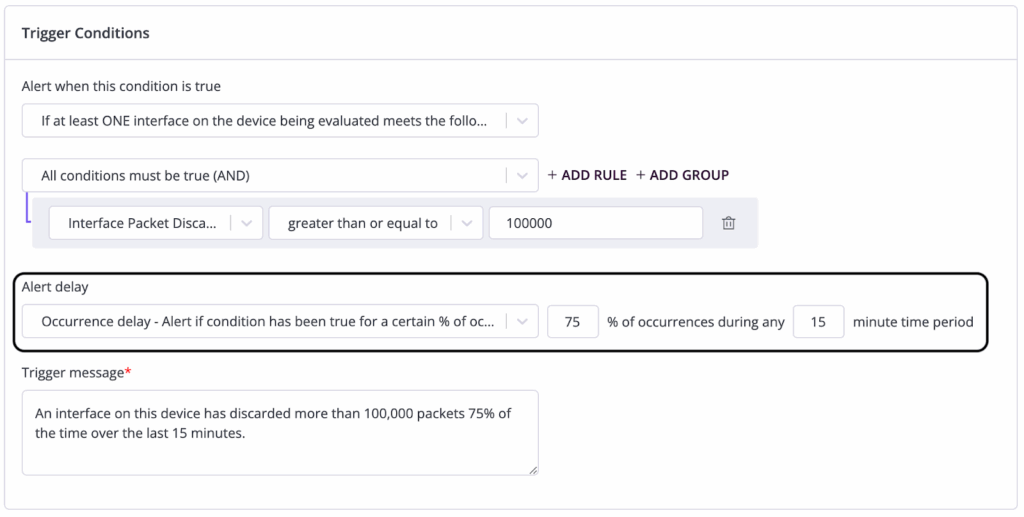
This proactive approach to defining when an alert is truly an alert can limit the need for technicians to apply ad-hoc alert pausing (which suppresses an alert on a specific entity for a predefined time) outside of maintenance windows.
Our Boolean and compound trigger logic helps rationalize multiple alerts into a single actionable notification
As you refine your alerting policies, Boolean operators and compound alert trigger logic can help you rationalize what would otherwise be multiple alerts to a single coherent alert representative of a real-world problem to solve. For example, you can create an alert that uses OR statements and tags to create an alert that contextualizes the network offline alert based on key network devices.
Auvik’s interface roll‑up reduces alert clutter for devices with multiple network interfaces
With Auvik, network devices with multiple interfaces can be configured to alert if ANY or ALL of the interfaces meet an alert condition. Defining the right logic can avoid cases where your technicians get dozens of alerts for a single device with multiple network interfaces. This one feature alone can meaningfully reduce inbox clutter and cognitive load on network admins responsible for managing devices like network switches, routers, and firewalls.
Our smart alert suppression prevents child device alerts from flooding inboxes when parent devices go offline
One of the biggest causes of alert floods occurs when a network’s “parent device” (e.g., primary router, switch, or firewall appliance) goes offline and all of the downstream devices go offline as a result. Auvik’s topology-aware smart alert suppression addresses this scenario by suppressing “child device” offline alerts when a parent is detected as offline.
Site-level alert suppression minimizes noise from entire offline sites
Similar to the “parent device” level alert suppression, site-level alert suppression addresses the use case where sites using a shared Auvik Collector are in an offline state. If the relevant parent devices are offline, all the noise from the associated downstream device alerts can be suppressed. This is particularly useful for MSPs that have isolated client sites monitored by separate Auvik collectors.
Auvik’s maintenance windows stop alerts during planned work to reduce unnecessary noise
Alerts during scheduled maintenance, such as system upgrades, planned downtime, and testing are textbook examples of noise. Auvik maintenance windows allow you to schedule maintenance and avoid the unnecessary inbox clutter during planned maintenance. Maintenance windows are recorded as maintenance history, so you won’t lose visibility into what happened if you need to review a device that was modified during a maintenance window.
Our alert pausing temporarily silences alerts during unexpected work to prevent noise
Unfortunately, when you work on real-world networks, you don’t always have the luxury of a maintenance window. Unexpected fires pop up (e.g., hardware failures, malware, and misconfigurations) that can lead to a lot of alert noise even when the technician working on the problem expects them based on the corrective action they’re taking (e.g., replacing a device, bouncing network interfaces, etc.).
Ad-hoc alert pausing allows you to temporarily disable (pause) alerts on specific network elements for a predefined window. This is a practical tool to help avoid creating noise when you’re working on a problem that doesn’t require the attention of other team members.
Auvik’s custom alerts and variables in notifications make alerts more actionable and informative
Context is essential for making alerts actionable by a human. Auvik Alert Notification Variables allow you to create custom alerts that can be enriched with key information such as hostname, software version, serial number, model, and IP address.
There are also device-type specific variables that can further improve the quality of information in an alert. For example, the $ups.capacity variable can be used in a UPS alert to include the percentage of battery remaining.
Our alert management ensures your alert policies stay effective and balanced over time
Alert management isn’t a point-in-time exercise that you can set and forget. Alert maintenance and governance is critical to maintaining a set of alert policies that effectively balance the signal:noise ratio. Auvik’s dashboard allows administrators to easily view and manage alerts from a central location, including making bulk changes and tuning Auvik alerts. This centralized management can help avoid “zombie alerts” that stick around for too long and simplify alert governance. Additionally, Auvik supports an audit log that tracks changes and allows administrators to reset alert settings to a default state.
Real-world results: Preventing alert fatigue with Auvik
Auvik’s alerting capabilities are purpose-built to help MSPs and IT teams operate more efficiently and focus on what matters. But, don’t just take our word for it, check out what real-world Auvik users have to say!
“The monitoring and alerting capabilities are excellent, and the remote access features save a ton of time troubleshooting without having to roll a truck. Reporting is clear and helps justify decisions with leadership. “
- Russell, Healthcare Industry pro that switched to Auvik from SolarWinds. (Source: Software Advice)
“Real time alerting has been something that we have done without in the past due to cost. Auvik was the perfect mid-tier priced solution to get us in the door and still allow us the opportunity to grow into a global product that we could use at all of our locations.”
- Kevin M., Global Information Technology Manager, (Source: Capterra)
See Auvik’s smart alerting in action
Auvik Network Management (ANM) provides MSPs and IT teams with real-time network visibility, including network topology mapping, automated network documentation, and robust network traffic analysis. Additionally, Auvik’s intelligent network alerting addresses the pain of alert fatigue and helps MSPs focus on the problems that really matter. Auvik’s 64+ pre-built alerts help MSPs stay ahead of issues and can improve MTTR by up to 75%.
But, don’t take our word for it, see for yourself in the Auvik Sandbox, an expert-led demo, or 14-day free (no credit card required) trial!

Book an Auvik demo
See how Auvik simplifies network management in a live, guided demo.